Client onboarding, end to end.
The complete 12-step flow from IB referral link to a fully-verified live trading account. Registration, email validation, Step I personal verification, Step II residence & investor profile.
Client journey starting point, when a user registers through your IB referral link. Tracking is automatic; what your team must verify is that the right link is used and onboarding doesn't stall between phases.
Auto-tracked to your account
- IB shares their unique referral link
- Client clicks the link
- Client is redirected to the 10X x MarketsVox registration page
- Tracking is automatic, no manual linking required if the link is used correctly
Registration → Email → KYC
- Phase 1 · Steps 1–3, Registration via IB link
- Phase 2 · Steps 4–6, Email verification (mandatory)
- Phase 3 · Steps 7–12, Account verification (Step I + Step II)
Four rules your team must enforce
- Always ensure clients use your correct referral link
- If the client registers without your link, they will not be assigned to your account
- Incorrect or incomplete registration may delay onboarding
- Your responsible for ensuring the client picks the correct account type after onboarding
Spec note, wallet currency
Per latest spec direction, wallet currency should default to USD without alternative options. But your still able to deposit in EUR, GBP or AUD.
Client access via IB link
The client enters the system through your IB master referral link. Tracking is automatic, no manual linking required if the link is used correctly.
- IB shares their unique referral link
- Client clicks the link
- Client is redirected to the 10X signup page
Important
The referral link automatically tracks the client to your IB account. No manual linking is required if the link is used correctly. If the client lands on registration without the link, the account will not be assigned to you, they must restart from your link.
Access via 10X sign-up
The client lands on the 10X sign-up page (Create your trading account). They fill out the form, create the account, and agree to platform conditions.
Enter
- First name
- Last name
- Email address
- Password
- Confirm password
- Phone (with country code)
Select
- Country of residence
Accept
- Terms & Conditions
- Privacy Policy
Action
- Click Create Account
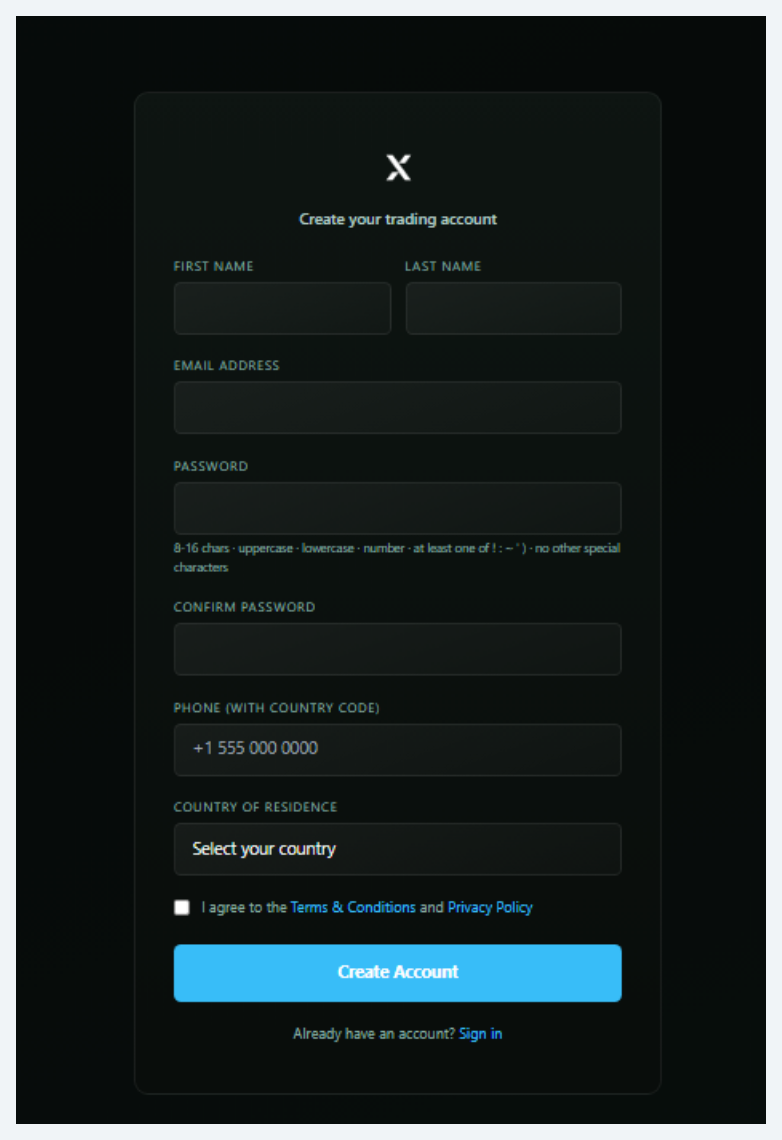
Password rule
8–16 characters · uppercase + lowercase + number · at least one of ! ~ ` · no other special characters.
Account creation
Final action of Phase 1. After completing the Live Sign Up form, the client commits the registration.
- Client clicks Register Now
- Account is created in the system
- Client is redirected to the Account Validation page (Step 4)
- Email validation message is dispatched to the registered email
What happens immediately after
After registration the client moves automatically to Phase 2 (email verification). The account exists in the system but is not yet usable: login is blocked until the email is confirmed in Step 6.
Result of Phase 1
- Account record created and linked to your IB
- Wallet currency locked as base currency of the account
- Email validation flow auto-triggered
Account validation screen
After clicking Register Now, the client is redirected to the Account Validation page on MarketsVox. This is a confirmation screen, no action is required here other than checking the email inbox.
- Account successfully created
- Email verification is required
- A validation email has been sent
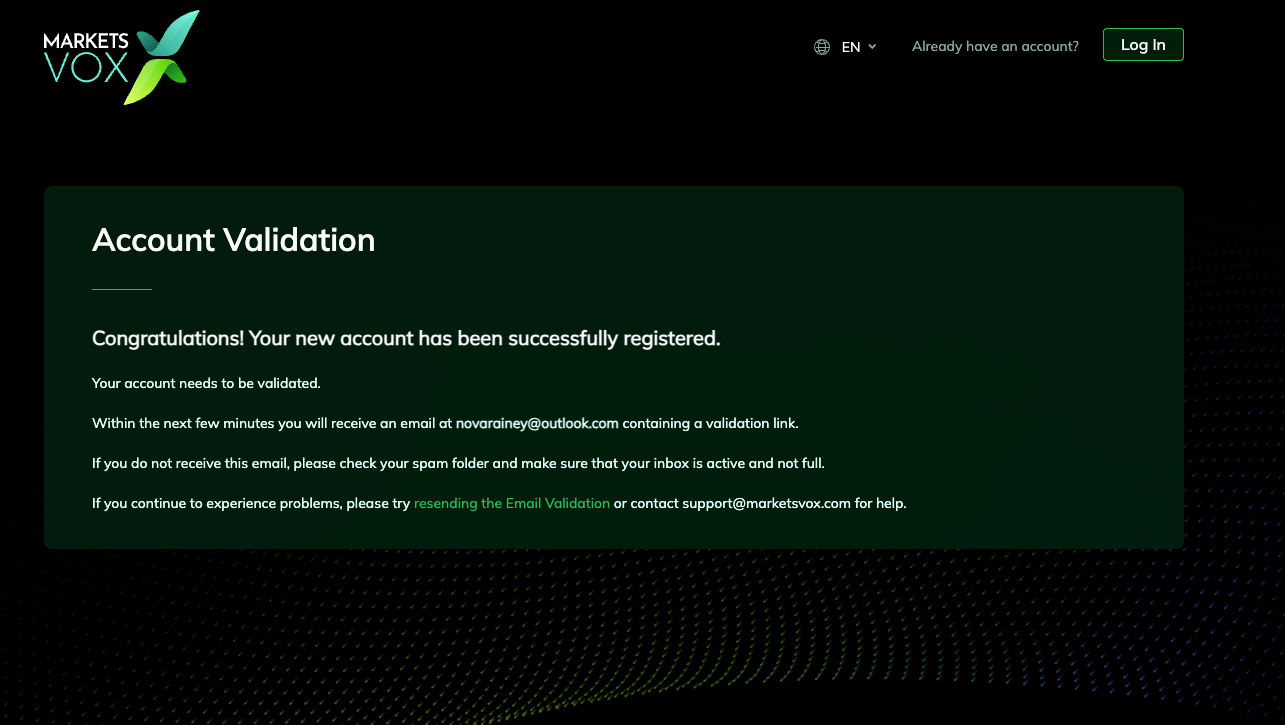
Verbatim message from the screen
"Congratulations! Your new account has been successfully registered. Your account needs to be validated. Within the next few minutes you will receive an email containing a validation link. If you do not receive this email, please check your spam folder and make sure that your inbox is active and not full."
Email received
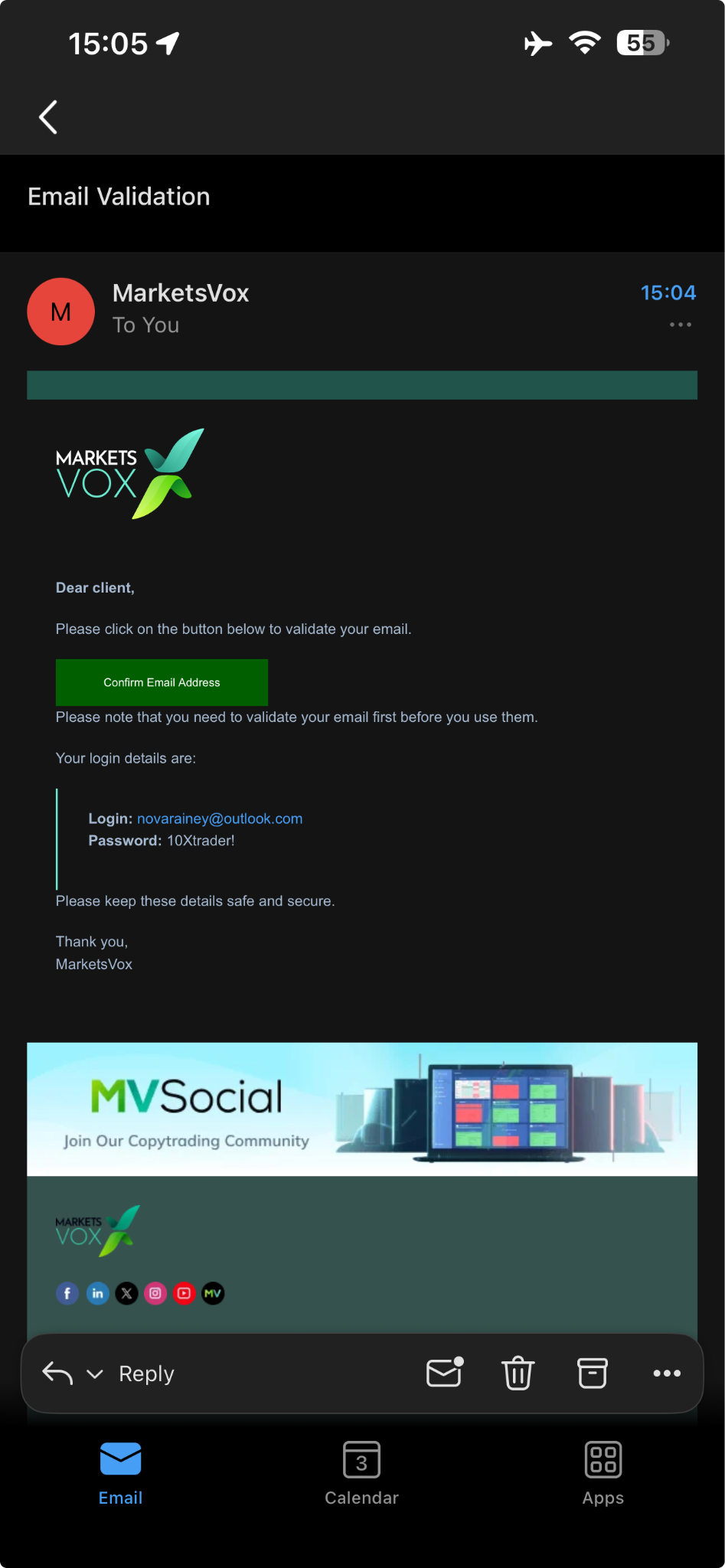
The client receives a validation email from MarketsVox at the address they registered with. The email contains everything they need to confirm the account and log in.
- A confirmation button labelled Confirm Email Address
- Login details: registered email and the password they set
- Instructions to validate the account
Sender + subject
The email comes from MarketsVox. If the client doesn't see it within a few minutes, the issue is almost always the spam/junk folder or a full inbox. Have them search "MarketsVox" before assuming delivery failed.
Email confirmation (mandatory)
This is the gate. Until the email is confirmed, the client cannot log in. The entire onboarding flow stalls here if Step 6 is skipped or fails.
- Open the validation email
- Click "Confirm Email Address"
- Email not received → client checks spam / junk folder
- Incorrect email entered at registration → registration must be repeated
- Email not confirmed → login will not work
What IBs must ensure
Clients complete this step immediately after registration. Clients understand that login access is blocked until verification is done. Any delay here stops the onboarding process completely.
Client logs in
After confirming their email, the client can log in to their MarketsVox account. Once inside the portal, they see the Account Opening Process section with the required verification steps for Step I and Step II.
- Step I Complete: Personal Details · Upload Proof of ID under Upload Documents
- Step I To get: Access to global and local payment methods · Deposits up to Step I limit · Trade without any limits
- Step II Complete: Upload Proof of Residence under Upload Documents · Investor Profile
- Step II To get: Unlimited deposits · Withdrawals · Unlock the full potential of MarketsVox
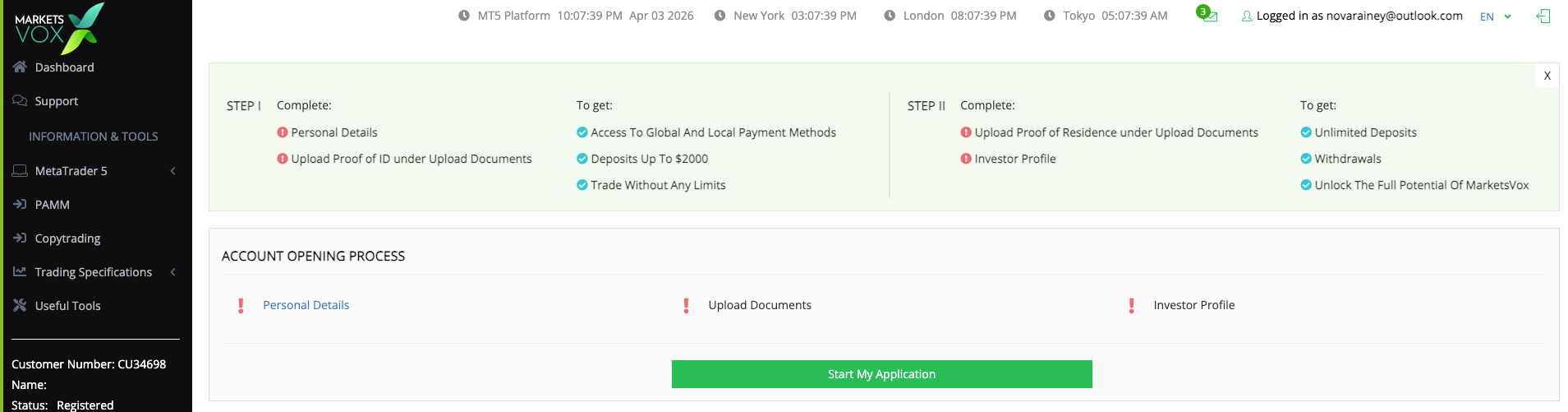
Application is gated
The client clicks Start My Application to begin Step 8. The full verification process is split into two stages, Step I unlocks payments and trading, Step II unlocks withdrawals and full account functionality.
Personal details
The client clicks Start My Application and completes the personal information form. This information must match the identity document they upload in Step 10.
- First name
- Last name
- Phone number
- Date of birth
- Residential address
- City
- Country
- Post code
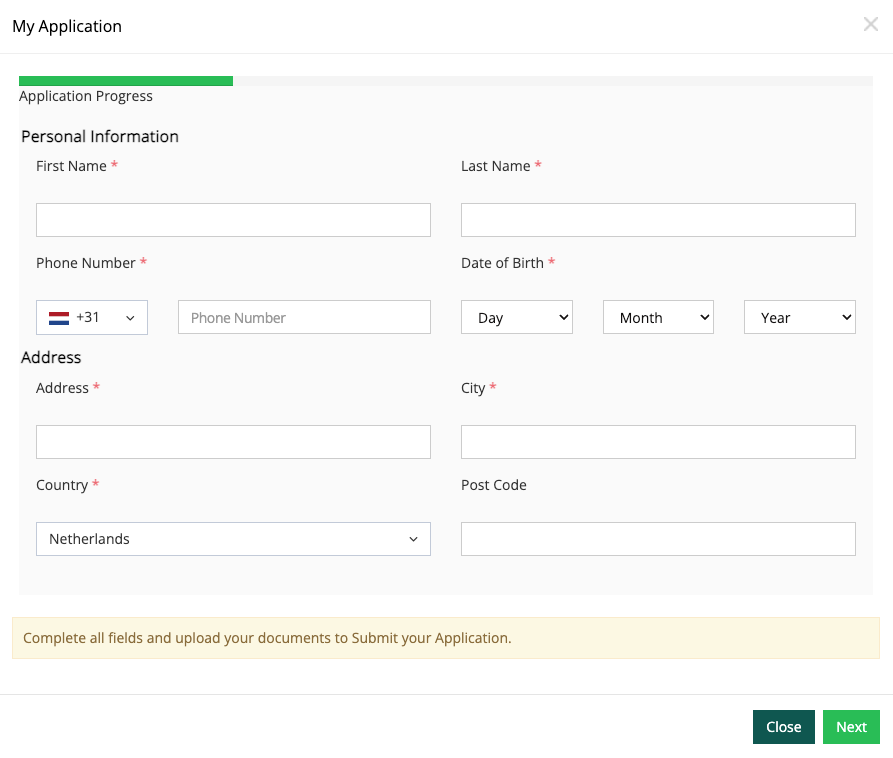
Match the ID exactly
This information must be completed accurately and match the client's identity documents. Typos, nicknames, or abbreviated addresses will fail verification in Step 10 and force a re-submission.
Data and privacy confirmation
As part of the application flow, the client must confirm they have read and accepted the applicable privacy and personal data processing notice. Standard regulatory consent.
- Read the Privacy Notice and the Notification to Processing of Personal Data
- Check the confirmation box
- Click Continue
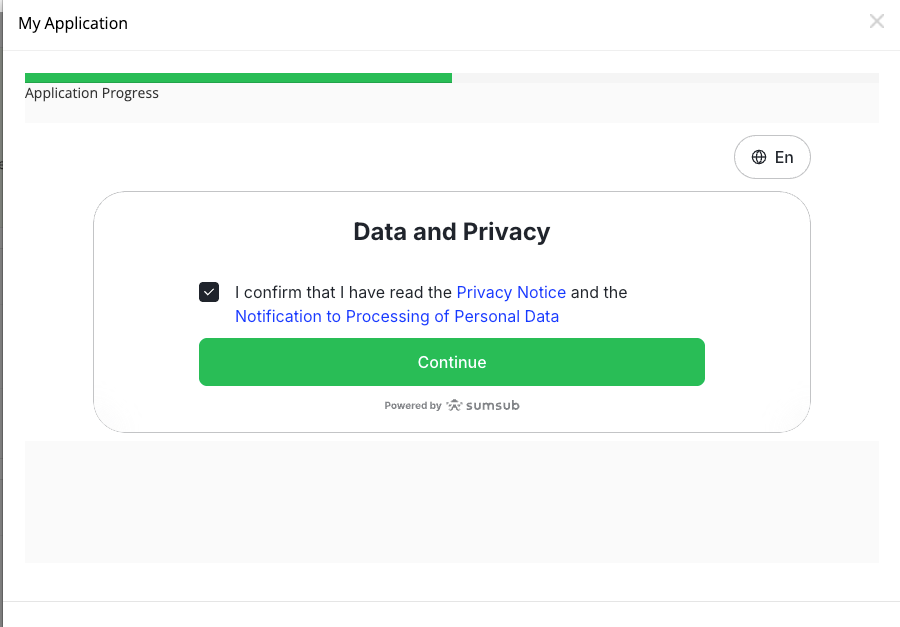
This is the consent gate
The application cannot progress to Proof of ID upload until this confirmation is accepted. If a client is stuck here, the most common cause is they haven't ticked the box before clicking Continue.
Proof of ID upload
Final action of Step I. The client uploads a valid identity document. The system asks them to specify the issuing country and document type.
- Issuing country
- Document type: options may include: Driving licence · Identity card · Temporary Protection Permit (PPT, if applicable) · Passport
The client can continue directly on desktop or switch to mobile if preferred.
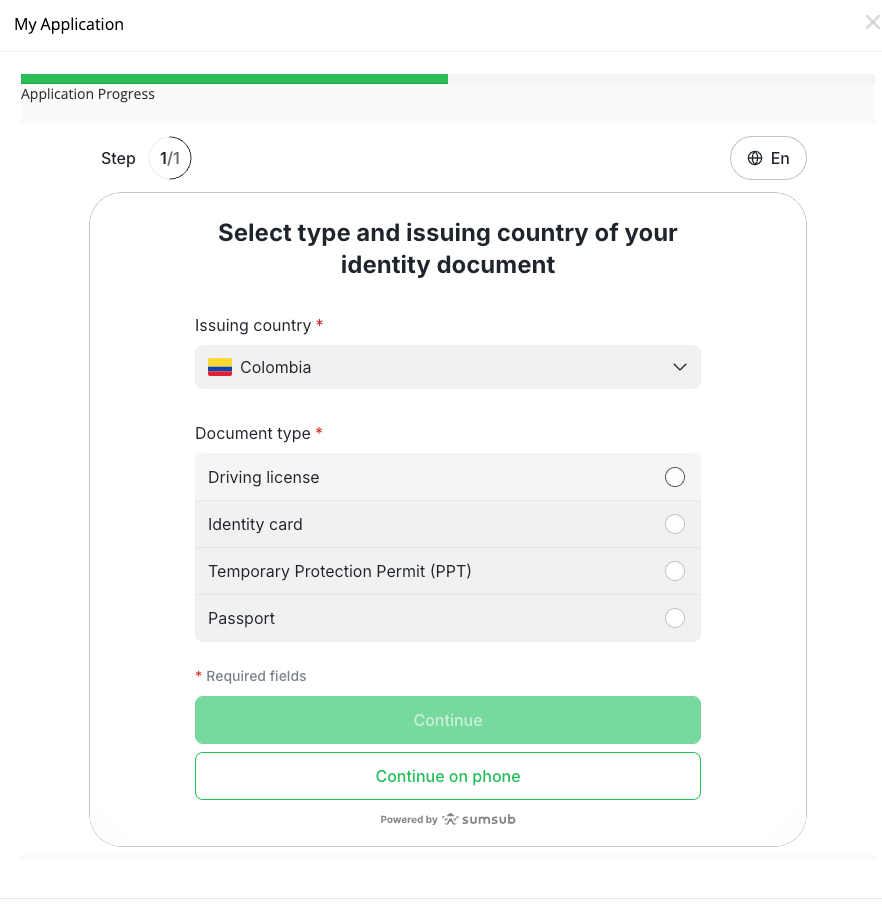
Important
The uploaded document must be valid and readable and must match the information entered in Step 8. Mismatched names or addresses are the number-one cause of rejection.
Result of Step I
- Access to available payment methods
- Deposit access up to the Step I limit
- Trading access
- Account is usable for funding and trading but not fully unlocked. Step II is still required for withdrawals.
Proof of residence
Step II begins. The client uploads a valid proof of residence document under Upload Documents. This proof must normally show three things.
- Client's full name
- Residential address
- Recent issue date
Address must match Step 8
The proof of residence must match the address entered during the application process. Common rejection reason: client moved between Step 8 and Step 11 and the proof shows a different address.
Acceptable document types
Confirm with 10X ops which exact document types are accepted in production (typically utility bills, bank statements, government letters). Not yet specified in source documentation, leave this section for 10X to fill in.
Investor profile
Final action of the entire onboarding flow. The client completes the Investor Profile section, required before the account becomes fully enabled for all functions.
This is part of the full onboarding process and is required before the account becomes fully enabled for all functions.
What the Investor Profile captures
Source documentation does not specify the exact fields of the Investor Profile section. Confirm with 10X ops before answering specific client questions about what's asked (typically: trading experience, financial situation, risk tolerance, but verify before quoting).
Result of Step II, onboarding fully complete
- Full deposit access
- Withdrawal access
- Full use of the MarketsVox account
- At this stage, the onboarding process is considered fully completed